FanParking.Space
Private season parking for sports and events

One exact spot.
Every home game.

Your spot for the season

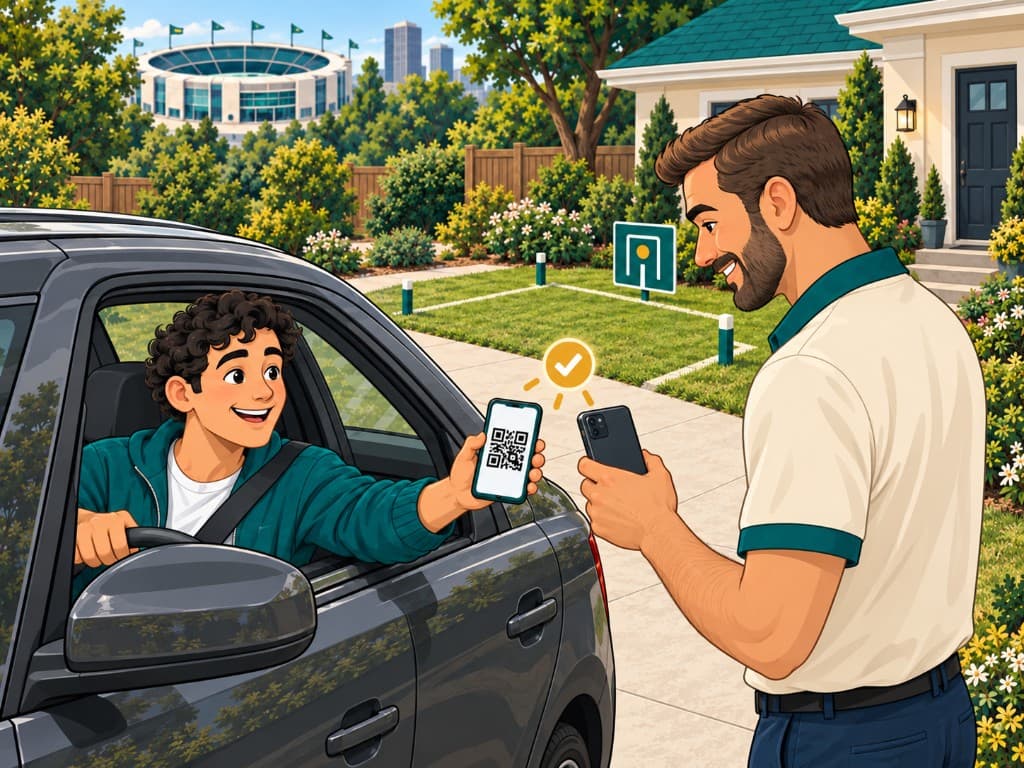
A fan holds up a Spot Pass QR code from the car while a host checks them in at a driveway near the stadium.
Scan in. Park. Enjoy.

FanParking.Space turns event-day parking uncertainty into a reserved destination. Fans coming to crowded sports venues or attending events with poor parking choices can advance-book their parking spot in private driveways, garages, lots, or yards. Your car's parking is covered for one-time events and multi-day experiences. Even lock-in the exact same spot for every home game.

Property owners turn game days into repeat seasonal bookings. Cities gain visibility, coordinated routing, and accountable reporting.

Anticipation → Confidence

Known destination

No circling blocks or surge parking lots on game day.

Arrival experience

Scan in. Park. Enjoy.

Quick driveway QR check-in and an assigned physical stall.

Community trust

Accountable & organized

Unobstructed egress, verified hosts, and transparent records.

The Three-Party Model

Nobody likes traffic or bad parking — and big events serve up both.

Anticipation → Organized action → Confidence

For a city, a packed stadium is a blessing and a curse: great for the economy, rough on the streets around it. FanParking.Space turns that scramble into a plan by aligning the three people who actually decide how an event day goes. Fans reserve a private spot near the venue ahead of time, property owners earn from space they already have, and cities get coordination instead of chaos. Order, predictability, and confidence — for fans, property owners, and cities alike.

For fans attending games

One exact spot. Every home game.

The Fan

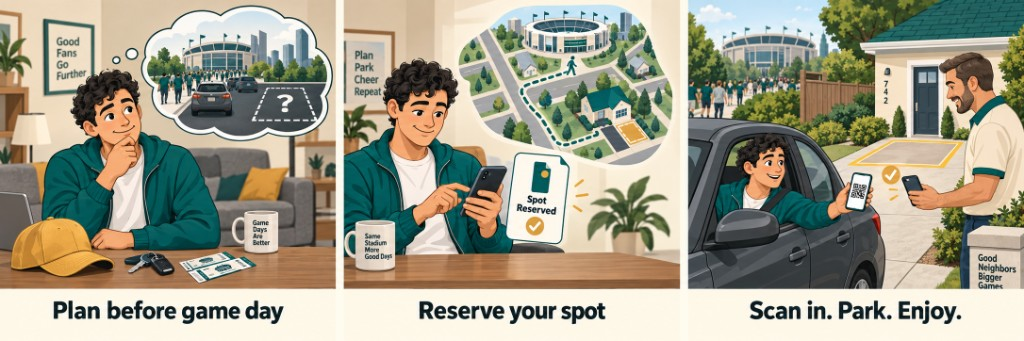
A fan turns parking uncertainty into a reserved destination and a straightforward arrival: from home anticipation to a singular reserved space and a quick driveway scan on game day.

The Fan illustration series: Scene 1 Plan before game day, Scene 2 Reserve your spot, Scene 3 Scan in. Park. Enjoy.
Plan before game day: Practical uncertainty turns into a plan — looking at tickets, departure time, and parking options before heading out to the stadium. Reserve your spot: Selecting one specific driveway or private lot on the map, with confirmed walking time, clear vehicle fit, and a confirmed Spot Pass. Scan in. Park. Enjoy.: Driveway arrival with a quick window QR scan from the host, a confirmed designated bay, and a short walk to kickoff.

How this works in practice

  • Reserve the same exact driveway, garage, or lot for every home game on your schedule.
  • Walking distance, vehicle dimensions, and arrival windows clearly visible before you pay.
  • Digital Spot Pass with QR check-in; the exact address is revealed privately after payment.

For property owners near venues

Turn event days into repeat bookings

The Property Owner

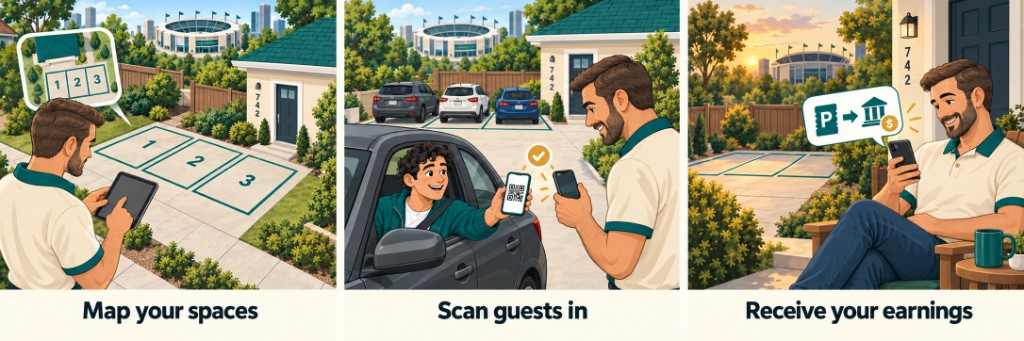
A property owner organizes available space on their driveway or yard, welcomes booked guests with a controlled check-in, and receives a clean payout record after the game.

The Host illustration series: Scene 1 Map your spaces, Scene 2 Scan guests in, Scene 3 Receive your earnings.
Map your spaces: Deliberate organization: outlining numbered parking bays with clear separation from sidewalks and unobstructed vehicle egress. Scan guests in: Controlled, welcoming arrival at the entrance: scan arriving guest passes on mobile and direct them to their assigned bay in seconds. Receive your earnings: A quiet, tidy property after the event with transparent transfer records and reliable income from repeat seasonal guests.

How this works in practice

  • Set your price per game, per race day, and for the Derby.
  • Seven quick steps — about ten minutes with your phone.
  • Renting? List with your landlord's OK; the owner gets paid too.
  • Payouts after each event — fans pay by card, and AI agents who book on behalf of fans can pay in USDC or Bitcoin (Lightning).

For lot owners and game-day crews

Run your lot like a pro on game day

The Lot Crew

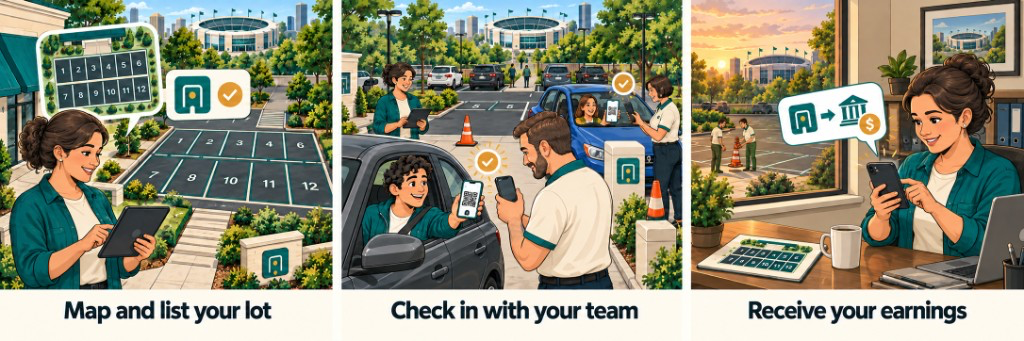
A lot owner turns an open paved lot into a numbered operation: mapping stalls before the event, running a check-in crew at the entrance, and collecting a clean per-event payout once the last car is parked.

The Lot Crew illustration series: Scene 1 Map and list your lot, Scene 2 Check in with your team, Scene 3 Receive your earnings.
Map and list your lot: A lot manager outlines numbered stalls one through twelve on a paved lot near the stadium, setting per-event pricing and how many spaces open for each game or race day. Check in with your team: Uniformed staff scan each arriving driver's QR code at the entrance while a second crew member directs traffic with cones, and every arrival lands on a shared today's-list in seconds. Receive your earnings: With the lot cleared, the manager reviews a tidy per-event record from her phone and watches the payout move straight to her account against a sunset stadium view.

How this works in practice

  • Lay out numbered stalls and invite your crew by email as check-in-only staff who see just today's arrivals.
  • Scan a QR or key in a code at each stall, with a live today's list that keeps the whole team in sync.
  • Payouts release after each event with a clean, per-event record of every stall you sold.

For renters and the owners they rent from

Rent the place? You can still host.

The Renter & Owner

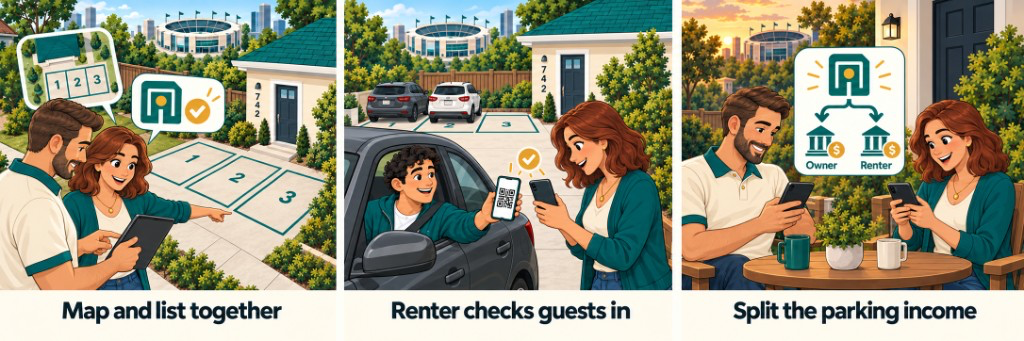
A renter and her landlord set up a driveway together, the renter runs game-day check-in on her own, and the parking income splits automatically between the two of them after each event.

The Renter & Owner illustration series: Scene 1 Map and list together, Scene 2 Renter checks guests in, Scene 3 Split the parking income.
Map and list together: A renter and her landlord map three driveway stalls at house number 742 on a tablet; a one-tap text from the owner records consent so the listing can go live without any paperwork. Renter checks guests in: On game day the renter scans an arriving fan's QR at the driveway and waves them into their stall — the owner never has to be home for parking to run smoothly. Split the parking income: Afterward the renter and owner relax at a patio table, each on a phone, as the net parking income splits automatically to both — the owner can even be paid by check without an account.

How this works in practice

  • The landlord approves with a single text — no paperwork needed for a handshake arrangement.
  • The renter runs check-in on event day, so the owner never has to be home.
  • Income splits automatically between renter and owner, and the owner can be paid by check without an account.

For municipal leaders & neighborhood planners

Make private event parking visible

The City

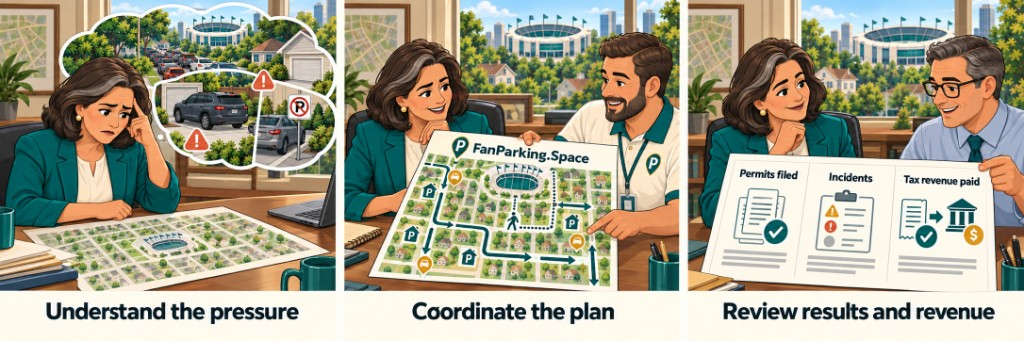
City leadership moves from event-day traffic pressure and parking complaints to a coordinated neighborhood plan with accountable municipal reporting.

The City illustration series: Scene 1 Understand the pressure, Scene 2 Coordinate the plan, Scene 3 Review results and revenue.
Understand the pressure: Recognizing the real neighborhood challenge: stadium traffic queues, blocked resident driveways, and uncoordinated parking search. Coordinate the plan: Collaborative review with FanParking: planned vehicle approach corridors, participating private properties, designated arrival points, and pedestrian routes. Review results and revenue: Accountable municipal reporting across three distinct pillars: permits filed, incident log status, and local tax revenue remitted.

How this works in practice

  • Designated private arrival points and pedestrian corridors reduce neighborhood circling and congestion.
  • Turn informal yard parking into a legible, coordinated off-street network.
Step-by-step

How booking a season spot works

Reserving a private parking spot is simple, transparent, and backed by confirmed event dates.

STEP 01

Pick the event, then the spot

Open Explore, start from the next game or race day, and choose a nearby private driveway, garage, lawn, or lot. Filter by walk time, vehicle fit, and price.

STEP 02

Book one date, several, or the season

Book a single event, a few dates, or lock the whole season. The spot is instantly blocked for those dates so it cannot be double-booked.

STEP 03

Scan in. Park. Enjoy.

Your digital Spot Pass provides turn-by-turn directions and a secure QR code. Arrive at the driveway, scan with the host, and walk to kickoff.

Verified spaces

Private off-street spot types

Every listing is clearly categorized so fans know their surface and fit before buying:

  • Private DrivewaysPaved / Concrete
  • GaragesCovered / Secure
  • Residential LawnsGrassed / Seasonal
  • Residential LotsSmall private parcels
  • Commercial LotsBusiness / Off-hours

Note: Curb or on-street parking is never listed by private hosts. It appears only as a clearly labeled, city-authorized module under an official municipal program.

Operational guardrails

Rules that make a season work

  • Same exact spot: A season package holds the identical physical space for every included home game.
  • No double-booking: Single-event bookings and season packages cannot overlap on the same spot.
  • Clear egress: Host parking layouts must leave an unobstructed corridor for vehicle and pedestrian exit.
  • Rescheduled games: Postponed or moved games automatically update your reservation once the new kickoff is confirmed.
  • Cancellation policy: Canceled events trigger an automatic credit, refund, or replacement.
  • Host verification: Hosts confirm legal right to list, follow HOA covenants, and respect local ordinances.
Questions & answers

Frequently asked questions

Clear facts on how booking, hosting, check-in, and municipal coordination work.

What is reserved when I book?
You reserve one exact private parking spot for the events you select. A full-season purchase covers every included home event listed on the venue schedule, guaranteeing the same physical space every game day.
How does arrival and check-in work on game day?
Scan in. Park. Enjoy. When you pull up to the driveway, present your digital Spot Pass QR code on your phone. The property owner scans it, confirms your vehicle details, and directs you to your numbered stall. No circling, no confusion.
When does the exact address and arrival instruction appear?
The full street address, host instructions, and gate/driveway notes appear after payment, and are revealed strictly to the booked fan, the property owner, and admins for safety and privacy.
How do property owners organize their parking spaces safely?
Hosts map numbered parking bays on private driveways, garages, lawns, or lots with clearly designated vehicle exit lanes and pedestrian corridors. Cars are parked deliberately so no one is blocked in.
What happens if an event is canceled or rescheduled?
Canceled events receive an automatic account credit, refund, or replacement according to reservation policy. Rescheduled or postponed games automatically update the reservation when the new date is confirmed.
Who can list a space?
Property owners and authorized hosts who confirm they have the legal right to offer the space and agree to follow local rules, HOA covenants, insurance requirements, and venue-area parking regulations.
What fees and taxes are shown?
Listings show the host price per event and full season package price. Applicable platform fees, state and local taxes, and civic fees are calculated transparently at checkout before you confirm payment.
How does FanParking coordinate with cities?
FanParking offers city pilots under authorized municipal programs where applicable. We provide structured reporting on permits filed, incident monitoring, and local tax remittance to make private event parking visible and orderly.
Is curb or street parking included?
FanParking.Space focuses strictly on private off-street stalls (driveways, garages, lawns, and lots). Curb parking appears only as a clearly labeled, city-authorized module when an authorized municipal program applies.
Can I keep the same spot for the entire season?
Yes. That is the core promise: a season package locks the exact same physical space for every included home event. The platform blocks those dates so your spot cannot be double-booked.
Can renters list a driveway?
Yes. Renters can list when they have landlord consent — formal (lease or writing), informal (verbal, confirmed by SMS), or a scoped exception when a lease otherwise restricts parking. Revenue can be split so the day-of operator and the property owner both get paid.
How do I find a spot for a specific game or race day?
Open Explore. It starts from the next upcoming event, shows price pins on a walking map with 5, 10, and 15 minute rings from the gate, and lets you filter by walk time, price, stall size, covered, tailgating, in-and-out, and EV charging. Tap a pin to see the walking route to the nearest gate.
What happens if kickoff time changes?
Your reservation stays on the same event. If the game is postponed, the new start time updates on your Spot Pass. If it is canceled, you get account credit or a replacement per the cancellation policy.
Can an AI agent book a spot for me?
Yes. Agents built on OpenClaw, Hermes, or any framework that reads Agent Skills install the FanParking skill from https://www.fanparking.space/skills/fanparking/SKILL.md, then list events, get the same quote a fan sees, hold a stall for 30 minutes, and pay the host directly with Bitcoin Lightning or USDC on Base. The agent receives the same Spot Pass. If it has no wallet or balance, it hands you the listing link so you can pay by card in the browser.

For agents

Your AI agent can book the spot for you

OpenClaw, Hermes, and any agent that reads Agent Skills can run the same loop a fan runs on Explore — pick the event, pick the stall, get the exact quote, hold it, pay — with no login. The agent pays the host directly with Lightning or USDC on Base and receives the same Spot Pass.

Skill file: https://www.fanparking.space/skills/fanparking/SKILL.md

STEP 01

Install the skill

Copy SKILL.md into your agent's skills folder.

  • OpenClaw: ~/.openclaw/skills/fanparking/SKILL.md or your workspace skills/ folder.
  • Hermes: hermes skills install https://www.fanparking.space/skills/fanparking/SKILL.md or drop it under ~/.hermes/skills/.
STEP 02

Pay the host directly

Hosts opt in by adding a Lightning Address or a USDC address on Base to a listing. The agent pays that wallet the full quote — host price, service fee, and any tax or civic fee. FanParking does not collect its service fee on-chain in this version. Holds last 30 minutes, the same as card checkout.

STEP 03

No funds? Book in the browser

If the agent has no wallet or balance, it stops at the quote and hands you the listing link. Open it, sign in, and pay by card — same stall, same Spot Pass. Cancellations and credits follow the cancellation policy either way.

Get started

Get in touch

Ready to book your parking or list a space? Have a venue you'd like us to launch in? Reach out directly.